AlertMessage Overview
What Is AlertMessage?
AlertMessage, exclusively from Affiliated Monitoring, is a modern text-based alarm response solution that allows your customers to quickly cancel a burglary alarm or request emergency services—entirely over SMS. It combines automation with the expertise of Affiliated’s monitoring specialists to deliver faster, more intuitive alarm handling.
Why Offer AlertMessage to Your Customers?
Today’s customers expect communication on their terms. AlertMessage lets them respond to burglary alarm events instantly, without answering a phone call. Partners offering AlertMessage see higher engagement, reduced false alarms, and a more seamless customer experience.
How AlertMessage Works (Customer Perspective)
When a burglary alarm activates, Affiliated normally attempts to reach the customer by phone and then works down their contact list. But in reality, fewer than 20% of people answer those calls. AlertMessage replaces this with instant text-based communication.
Scenario 1: False Alarm at Home
Imagine your customer, George, accidentally sets off his alarm while letting the dog out. Within seconds, AlertMessage sends him a text. George replies “1” to cancel the alarm and enters his passcode. The alarm is immediately resolved, and all contacts receive a notification indicating that George cancelled the alarm.
Scenario 2: Real Emergency While Away
If George is away from home, he can reply “2” to request emergency services and confirm with “Y.” A monitoring specialist dispatches authorities, and all contacts receive real-time updates.
ALERTMESSAGE WORKFLOW
Now that we’ve covered the customer experience at a high level, the following section outlines exactly what your customers see during a real alarm event.
1. Welcome Message
The first time a customer experiences a burglary alarm after AlertMessage is enabled, they receive a Welcome Message confirming they are enrolled.
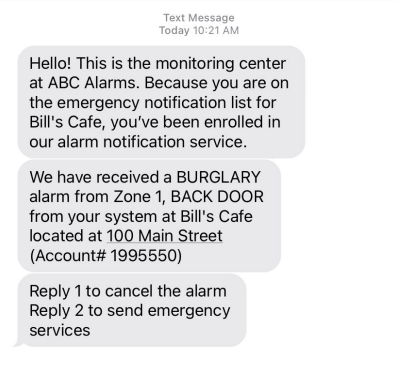
2. Alarm Event Details
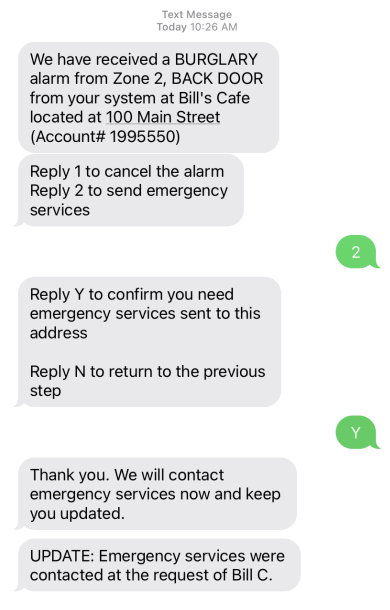
When an alarm activates, customers receive a message containing the event details, including zone number, description, site name, and account information.
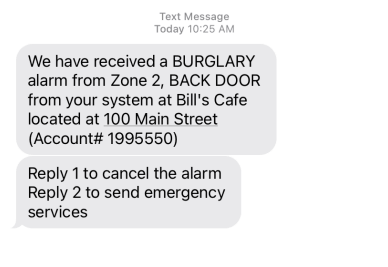
3. Cancelling an Alarm
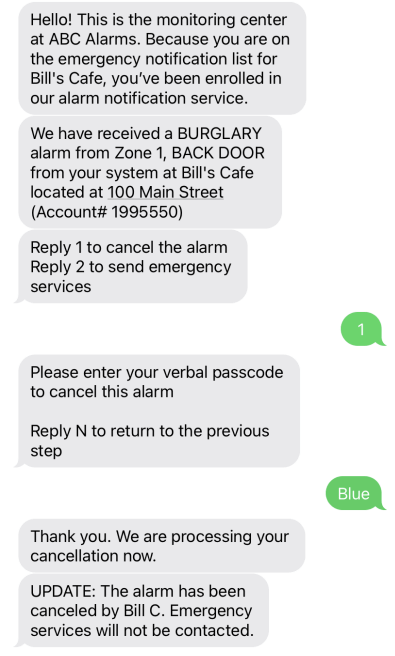
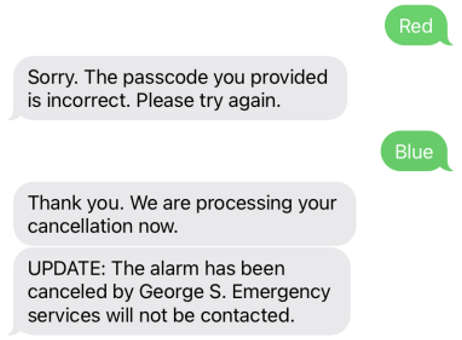
If the customer replies “1” to cancel the alarm, they are prompted for their passcode. After validation, they receive a confirmation update, and all AlertMessage-enabled contacts are notified.
Verify Contacts (Optional Feature): Customers designated as Verify contacts are not required to enter a passcode.
 |
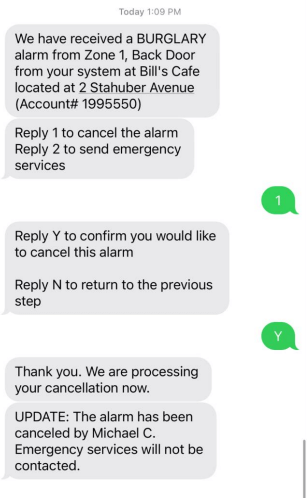 |
| Passcode required. | No passcode required. |
4. Requesting Emergency Services (Dispatching)
If the customer replies “2,” they receive a confirmation prompt before the alarm is routed to a specialist at a higher priority for dispatch. An update message is sent to all AlertMessage-enabled contacts.
5. Incorrect Passwords
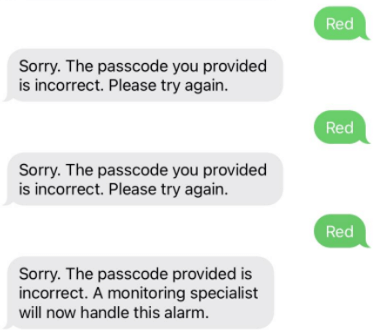
If a customer enters the wrong passcode, they receive prompts to try again. After three incorrect attempts, they are notified that they have reached the limit.
 |
 |
| An incorrect attempt | Three incorrect attempts |
6. Delayed or No Response
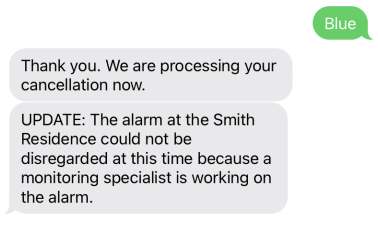
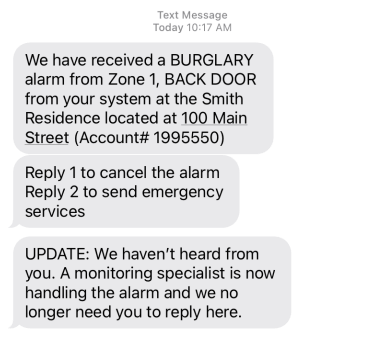
If a customer responds after a specialist has already taken over the event, they receive an update explaining that the alarm is already being handled. If they never respond, they receive a message indicating that no further action is needed.
 |
 |
| Delayed response | No response |
7. Alarm Aborted at the Panel
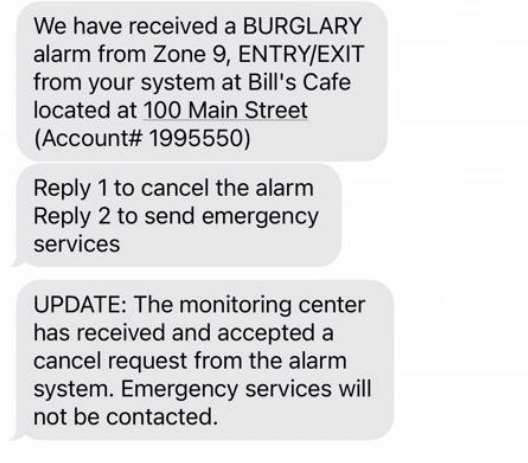
If the alarm is cancelled at the panel, AlertMessage detects this and notifies the customer that the alarm is no longer active.
EVENT HISTORY IN THE AFFILIATED PORTAL
Dealers can review AlertMessage activity in Event History. Entries show who received each AlertMessage SMS and whether the customer interacted with the system.

TRY ALERTMESSAGE FOR YOURSELF
To try AlertMessage firsthand, text 855-700-4225. You’ll receive an interactive demo showing exactly what customers experience. This is an excellent tool for training and sales demonstrations.